

CRM
CRM person and company pages are ordinary outline pages carrying a bit of structured metadata. Every email you exchange and every calendar invite you accept quietly builds out this directory for you: new contacts get pages, threads and meetings file themselves under the right person, and near-duplicate contacts get flagged instead of silently merged.
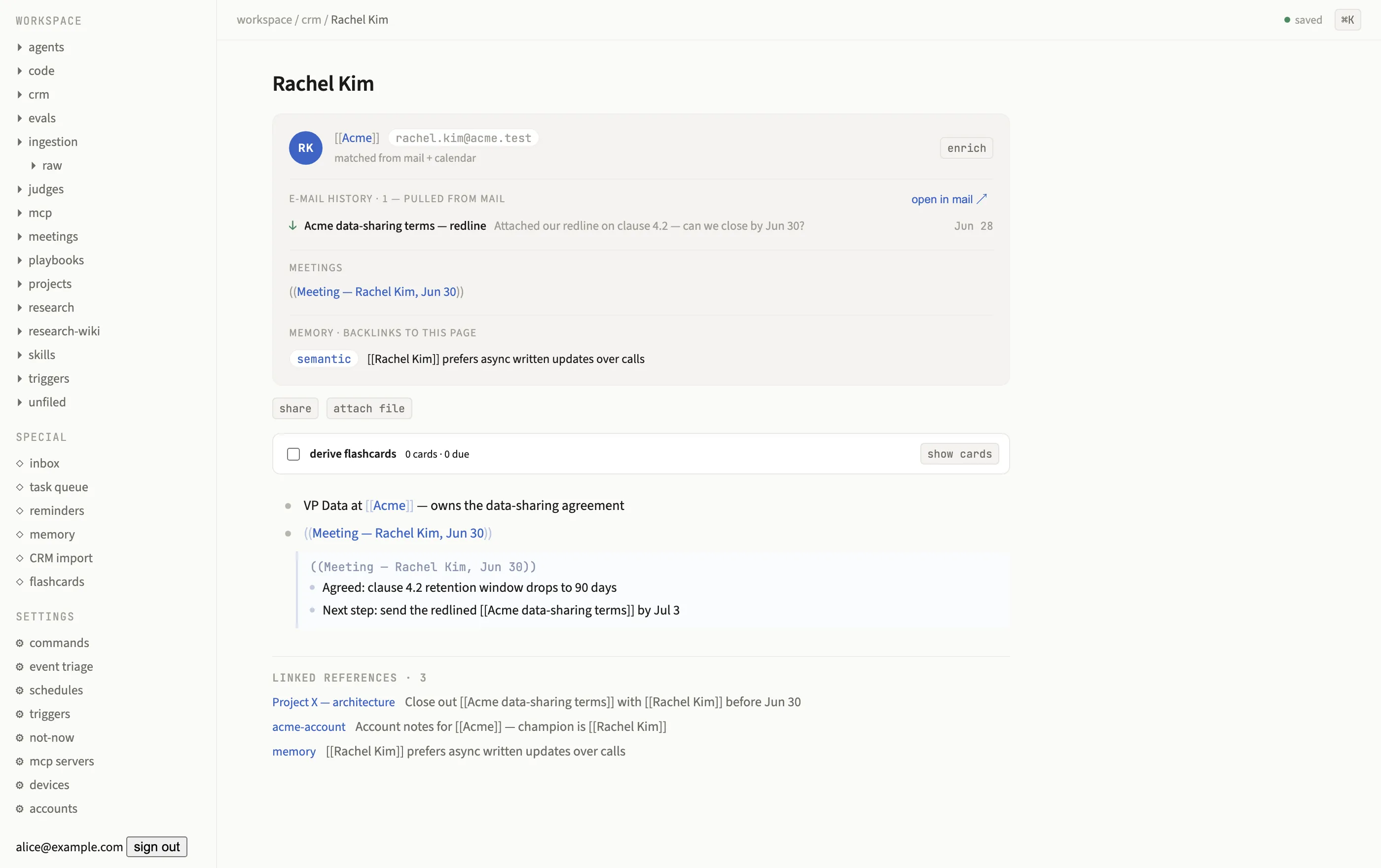
A person page auto-built from mail and calendar, with email history, an embedded meeting, and memory backlinks.
Pages are just pages
Section titled “Pages are just pages”A CRM page lives under crm/ like anything else and carries metadata.crm: {kind: 'person', email, company?} or {kind: 'company', domain?}. An identity index,
comms.crm_identities, maps email addresses (and normalized names) to page ids, which is
what lets mail, calendar, and IM all agree on which page a given human is.
Auto-create from mail and calendar
Section titled “Auto-create from mail and calendar”A background consumer watches every inbound mail sender and calendar attendee. An email address it hasn’t seen before creates, in one transaction:
- a person page, titled from the sender’s display name (or the local part of the
address, title-cased, with duplicates disambiguated as “Name (domain)”), carrying
email::andcompany::header bullets; - a company page derived from the email’s domain, with a
domain::bullet and aPeoplesub-tree the new person gets added to (freemail domains, Gmail, Outlook, Yahoo, iCloud, Proton, and the like, are skipped, they don’t identify an organization); and - the identity row tying the email to the new page.
This is idempotent (a unique constraint plus an advisory lock per address means redelivery is a no-op), and it works off both mail (including backfilled history) and calendar attendees, with your own addresses and calendar self-attendance skipped.
Near-miss merges
Section titled “Near-miss merges”Auto-create never silently merges two records that might be the same person. If a new email’s normalized name matches an existing identity, or near-matches an existing CRM page’s title, the new page still gets created (the mail history it’s attached to needs somewhere to live), but a needs-confirm card lands in the task queue with a keep/merge diff, showing which emails and names differ between the two candidates.
- Confirm runs the same merge primitive any page merge uses: nodes transplant onto the keeper, aliases join, backlinks re-point, the loser redirects to the keeper, and the identity index re-points to match. It’s logged like any other merge.
- Dismiss keeps both pages as-is; the decision is recorded so a stale card can’t re-trigger the same prompt.
The CRM block
Section titled “The CRM block”Any page carrying metadata.crm renders a block between its title and outline: an avatar,
chips for company (linked) or people (for a company page), email addresses, and domain.
Below that:
- Email history: the last ten messages to or from this person, subject, snippet, day, and direction, with a link out to open the thread in Mail.
- Meeting links: meeting pages this person attended, whether linked through a shared calendar event or embedded directly.
- Memory backlinks: a footer of active memory items that reference this page.
Person pages also get an enrich button that invokes the enrichment agent against them.
Enrichment agent
Section titled “Enrichment agent”The crm-enrich agent definition takes a person page as its
argument and, using a web.fetch tool (GET only, HTTPS only, a 5-second timeout and 1 MB
cap, with a crude tag-stripping text extraction capped at 8k characters), looks the person
up and files what it finds as a fact:: bullet on their page, plus a proposed
memory item for anything worth remembering long-term. Under the
deterministic fake, web.fetch only answers registered fixture URLs, everything else
returns a clearly-labeled disabled notice, so enrichment behaves predictably in tests.
Bulk import
Section titled “Bulk import”The CRM directory page carries an import panel that accepts CSV, XLS, or XLSX files. Upload one and Subspace:
- reads every worksheet, matching columns against a generous set of header aliases (
name/full name/contact,email/email address/work email,company/account/organization,linkedin,stage, and more), so an export from almost any CRM or spreadsheet tool works without reformatting; - resolves each row through the same identity resolution auto-create uses, exact email first, then normalized name, so importing a contact you already have from mail history updates their page instead of duplicating it;
- reports row-level errors (a missing email, an unresolvable identity) without discarding the rest of the workbook; and
- caps a single import at 5,000 rows and a 15 MB file.
Import is an admin-only action. The result summarizes how many people were created versus matched, how many companies were touched, and lists every imported person so you can immediately select who to reach out to.
Outreach sequences
Section titled “Outreach sequences”Selected people from an import (or any CRM page) can be enrolled straight into a durable outreach sequence: an intro email, an IM connect note, a threaded nudge, and a follow-up DM, spaced out with quiet windows and automatically cancelled the moment the prospect replies on either channel. Every outbound touch is individually approval-gated, scheduling a sequence never sends anything by itself, and each touch, cancellation, or completion appends a line to the prospect’s CRM page, alongside the rest of their activity.