

Tables & formulas
The table element is a spreadsheet grid living inside a node: cells hold values or formulas, formulas can reference other cells on the same table, cells on a differently named table anywhere in the knowledge base, or labeled nodes on other pages, and every dependent recomputes automatically when something it reads changes. It follows the same node-frame pattern as every other element.
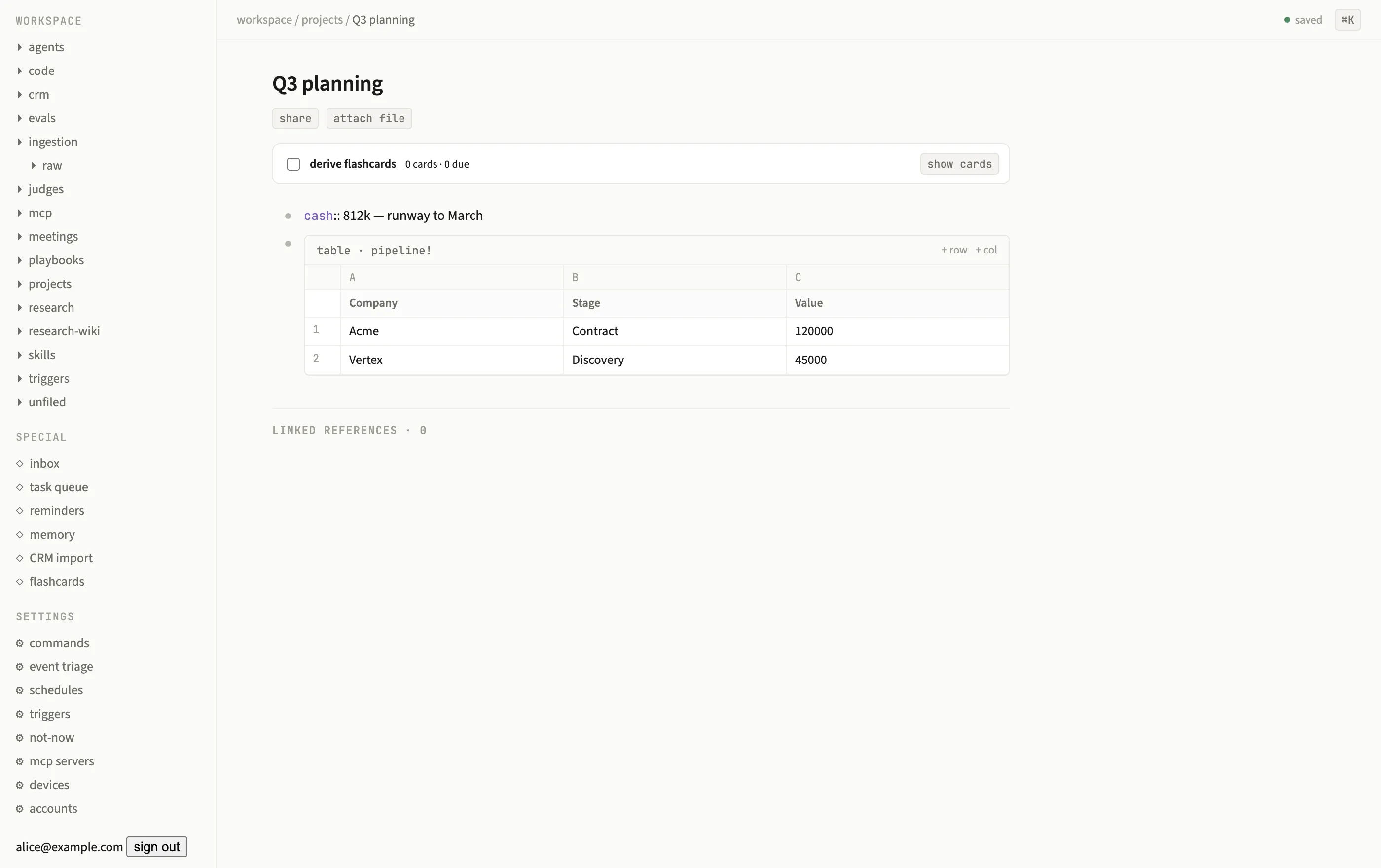
A named pipeline! table lives inline in the page, addressable from formulas anywhere in the graph.
The grid
Section titled “The grid”A table shows column letters (A, B, …), an optional named-column band, and 1-based
data rows, the same conventions as any spreadsheet. Click a cell to edit it; Enter or
blur commits the change, Escape cancels it. The action area in the frame header carries
+ row and + col.
Every cell stores a small pair:
type Cell = { v: unknown; f?: string };v is the last computed value; f, present only on formula cells, is the formula
source. Typing a plain number stores it as a number; typing anything else stores it as
text. Typing a value that starts with = stores it in f and the grid computes v from
it.
Named tables
Section titled “Named tables”Give a table element a name (element.name) and every other table or formula in the
knowledge base can address it by that name, regardless of which page it lives on:
=pipeline!B1This is what makes tables composable across pages: a dashboard page can pull live numbers
out of a dozen project pages’ tables without duplicating the data. Renaming or deleting a
named table re-binds every formula that referenced it: dependents of the old name resolve
to #REF, and any formula that was already written against the new name (previously
dangling) binds and computes immediately. Creating a table under a name that formulas
were already waiting on binds the same way, so you can write =roadmap!C4 before the
roadmap table exists and it lights up the moment you create it.
The formula engine
Section titled “The formula engine”Formulas are parsed and evaluated by @subspace/formula, a pure package with no
database knowledge: it takes a formula string and a resolution context and returns a
value plus the set of references it read. That separation is what lets the same engine
run identically on the client (for instant local recompute) and the server (for the
authoritative result).
Addressing. Formulas use standard A1 addressing plus three ways to reach outside the current cell:
| Form | Meaning |
|---|---|
=C2 |
A cell on the same table |
=SUM(C1:C2) |
A range on the same table |
=pipeline!B1 |
A cell on a table named pipeline, anywhere in the KB |
=[[Q3 planning]]:cash |
The value of a labeled node named cash on the page Q3 planning |
Functions. SUM, AVERAGE (alias AVG), MIN, MAX, COUNT, IF, ROUND, ABS,
CONCAT. Operators: + - * / % ^ for arithmetic and & for string concatenation, plus
the usual comparison operators.
Coercion. Formulas try hard to make loose input arithmetic-ready: $610,000, 812k,
and 1.5M (even with a trailing note like 1.5M projected, the numeric prefix is what
coerces) all coerce to numbers when used in arithmetic.
Errors are values, not crashes. A bad formula never throws into the UI; it resolves to one of:
| Error | Meaning |
|---|---|
#DIV/0 |
Division by zero |
#REF |
Reference to a cell, table, or label that no longer exists |
#VALUE |
An operand couldn’t coerce to the type an operator needs |
#CYCLE |
The formula participates in a circular dependency |
#PARSE |
The formula string didn’t parse |
Reactive recompute
Section titled “Reactive recompute”Every formula reference the engine reads while evaluating a cell is recorded as an edge
in kb.deps. On every commit, an outbox consumer walks
the affected slice of that dependency graph in topological order, cycle-guarded so a
circular reference resolves every participant to #CYCLE instead of looping forever,
recomputes each dependent cell, writes the new value, and publishes a ref: patch that
live-updates every open window. This closure walk crosses pages freely (a formula on page
A depending on a table on page B recomputes the moment B’s table changes) and typically
lands in well under 100ms.
Bidirectional liveness means recompute isn’t limited to “cell changed”: editing a
referenced cell re-renders every node that depends on it, and editing a label (the
text before the : in a [[Page]]:label reference) recalculates every formula that
reads that label. Either direction of edit propagates.
Granular, conflict-free edits
Section titled “Granular, conflict-free edits”Table edits are per-cell (and per-row, per-col for structural changes) commands, not whole-table rewrites. Two people editing different cells of the same table concurrently each produce independent commands that both apply cleanly, the same last-write-wins convergence the command model gives every other kind of edit, just scoped narrowly enough that “different cells” almost never collides.