

Pages & directories
Every page lives at a stable, human-readable slug, sits under exactly one directory, and can be referred to by more than one title over its lifetime. Renames and merges are atomic graph operations, so a page’s identity survives changing your mind about what to call it.
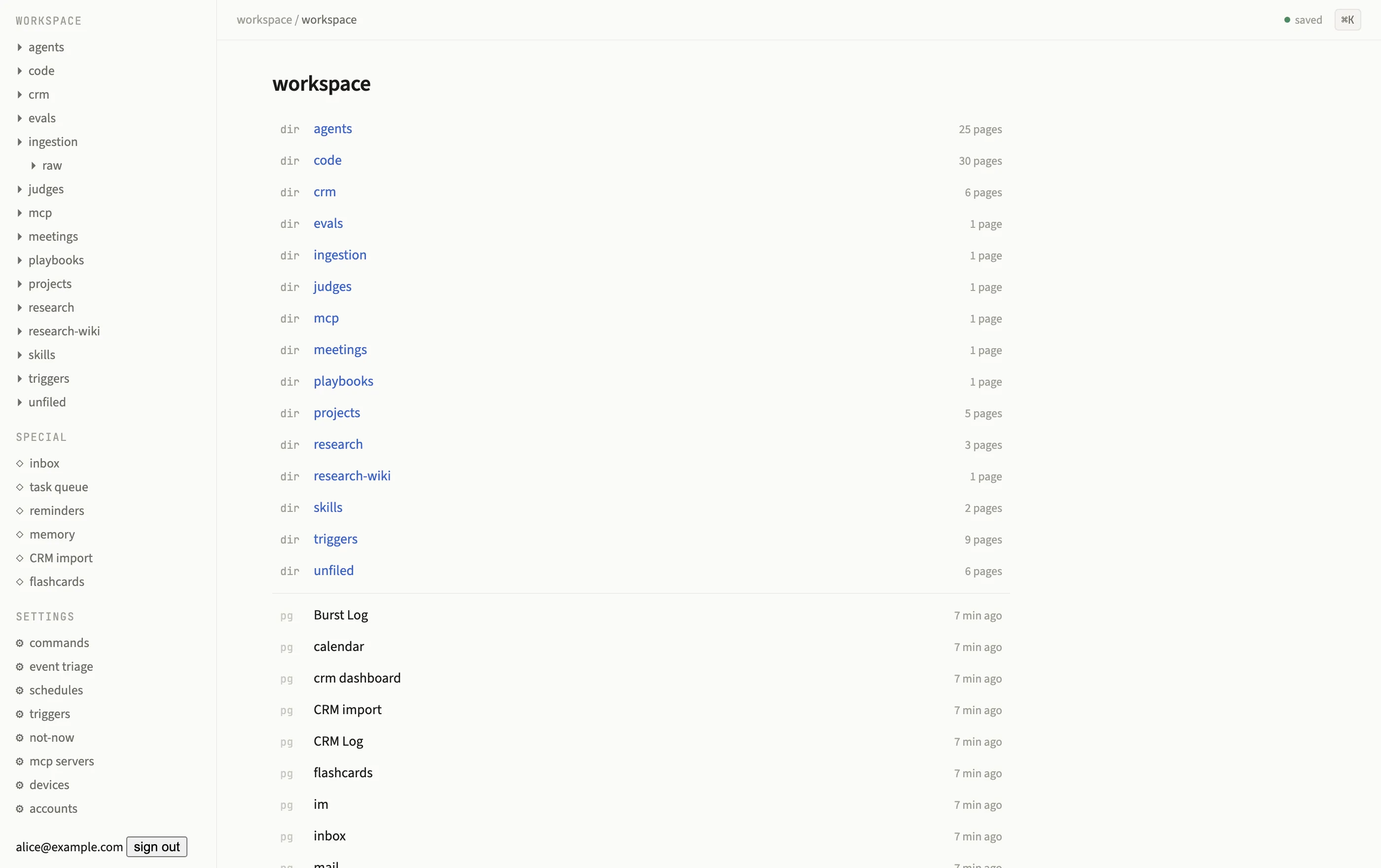
A directory page lists its child directories and pages, with the directory tree in the sidebar.
Page kinds
Section titled “Page kinds”The kind column on kb.pages gives every page one of three shapes:
| Kind | What it is |
|---|---|
outline |
An ordinary page: a tree of bullets. Most pages are this kind. |
directory |
A folder that is itself a page, with its own title, metadata, and (optionally) body bullets. |
element |
A page whose body is a single element with annotation bullets around it, for example a PDF or an image. |
Configuration surfaces, agent definitions, skills, MCP server registrations, judges, and
settings are ordinary outline pages under reserved directories (agents/, skills/,
mcp/); see Agents overview and Plugins overview.
Slugs, aliases, and titles
Section titled “Slugs, aliases, and titles”A page has an editable title (click it at the top of the page to rename) and a
slug derived from it, the identifier that appears in the URL and in kb.pages.slug.
Past titles are retained as aliases in kb.page_aliases, so old links, bookmarks, and
[[references]] under a superseded title keep resolving. See
link and alias resolution for exactly how a
[[Title]] reference is matched: exact title, then alias, then implicit creation.
Atomic rename
Section titled “Atomic rename”Renaming a page runs as a single transaction that:
- Updates
kb.pages.title(and recomputes the slug). - Rewrites every
[[Old Title]],((Old Title)), and#Old Titleoccurrence, on every page that references it, to the new title. - Adds the old title to
kb.page_aliases, so anything that still resolves the old name (an external bookmark, an agent’s stale memory) lands on the same page.
All of this commits as one Postgres transaction, so a reader can never observe a half-renamed graph.
Merging pages
Section titled “Merging pages”Merging two pages (for example, two CRM records that turned out to be the same person)
also runs as one commit: the surviving page absorbs the loser’s aliases, every backlink
that pointed at the loser is re-pointed at the survivor, the loser’s redirect_to column
is set to the survivor’s id, and a row lands in the task queue’s done
log recording the merge. Visiting the loser’s old slug transparently redirects to the
survivor.
Directories
Section titled “Directories”Directories are ordinary pages with kind = 'directory'. A directory page renders as a
listing of its children, directories first, then outline and element pages, each with its
last-updated timestamp. Every page (except the workspace root) shows a breadcrumb
trail back through its ancestor directories.
-
Sidebar tree
The sidebar shows a VS Code-style tree of directories only (no individual pages clutter it). Drag a directory onto another to reparent it; this issues a
movePagecommand like any other edit, so it is undoable and audited. -
Directory page listing
Open a directory (click it, or navigate to its slug) to see its full contents: child directories first, then pages, each row showing a title and a last-updated timestamp.
-
Board view
Every directory page except the workspace root also has a
list | boardtoggle next to its title. Board view lanes the directory’s non-directory children by a status field,metadata.statusby default, configurable per directory via{ board: { statusField: 'stage' | 'crm.stage' | …, columns: [...] } }in the directory’s own page metadata. Statuses outside the configured column list get their own extra lane; pages with no status land in a trailing(none)lane. Dragging a card to a different lane writes the new status through the ordinarykb.commandwrite path (setPageMetadata), so it is journaled like any other edit; dropping on(none)clears the field.
The unfiled directory
Section titled “The unfiled directory”Typing [[Some New Page]] for a title that does not exist yet never errors or blocks
your edit: Subspace creates the page on commit and files it under a special unfiled
directory, so it is linkable immediately. Move it into a proper directory later by
dragging it in the sidebar, like any other page.